Bringing the Cloud to localhost, Part 1: Why We Looked Beyond Mocks
Say you pick up a small ticket. Users should be able to replace their profile picture, and the new image shouldn’t appear until the upload has actually finished.
On paper it’s a frontend tweak and a status column. You can run the React app locally. You can run the backend locally. The code isn’t the hard part.
The hard part is everything the feature passes through. Changing a profile picture takes seven steps:
- Sign in. The user asks to log in and gets a one-time code by email. (Amazon Cognito handles sign-in, AWS Lambda creates the code, Amazon SES sends the email.)
- Get a login pass. After entering the code, the user receives a pass (a token). Our backend has to recognise it.
- Prepare the upload. The backend loads its settings and notes in the database that an upload is coming. (AWS SSM Parameter Store, PostgreSQL.)
- Hand out an upload link. The backend gives the browser a short-lived link that allows one upload to file storage. (Amazon S3.)
- Upload. The browser sends the picture straight to file storage.
- Confirm. File storage signals that a new file has arrived, and a second small program marks the upload as finished in the database. (AWS Lambda.)
- Show it. Only now does the new picture appear.
That’s a browser, two pieces of our own code, a handful of managed services and two kinds of Lambda trigger. Change one link and the question isn’t “does my function return 200?” It’s “does the whole chain still hold?”
Too often, the practical answer to that was: deploy it and try.
Deploying once is fine. Deploying for the fifth time in an afternoon to check a small fix is tedious. And it becomes a real problem when the place you deploy to is shared.
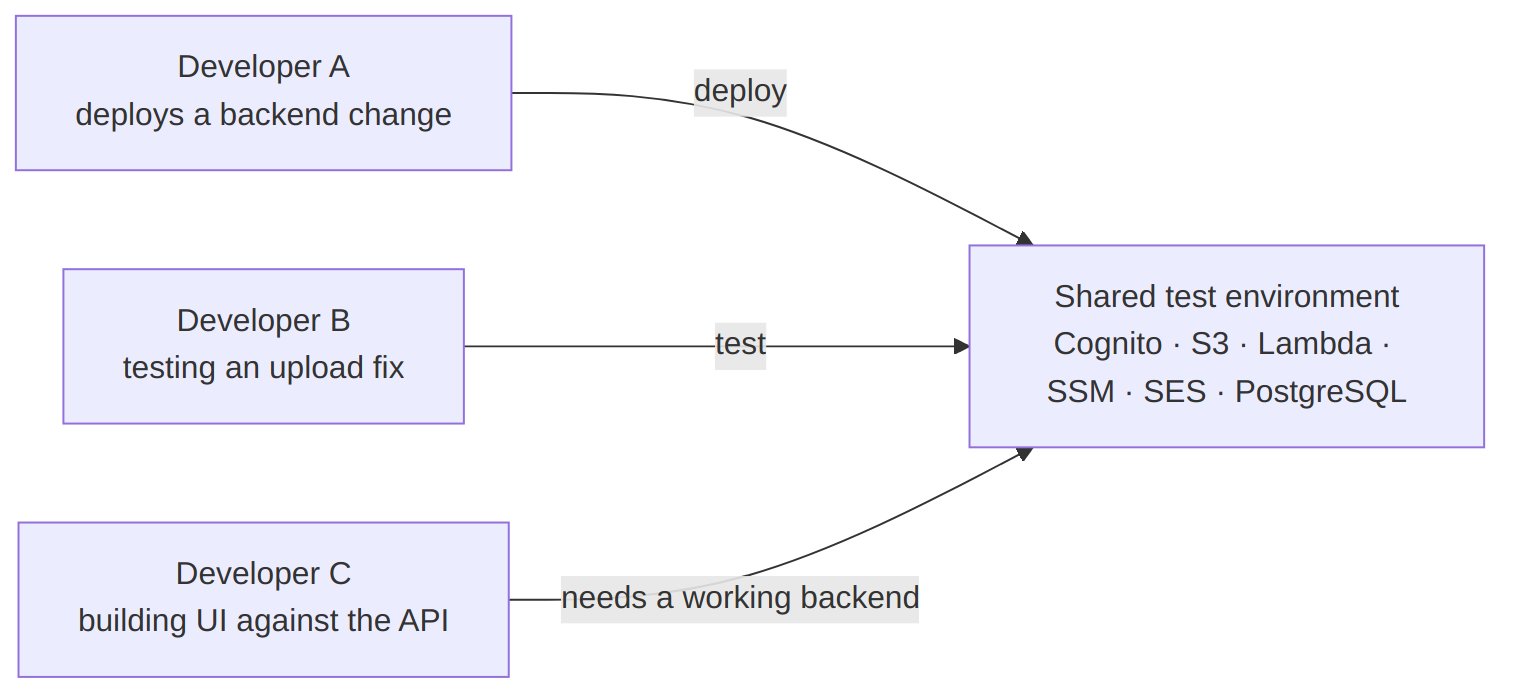
Nothing in that picture is wrong in itself. A shared test environment is where real integration happens, and you want one. The trouble starts when it also becomes the place where every iteration happens.
A’s deployment changes the backend while B is halfway through a test, so B’s results no longer mean anything. If A’s change has a bug, C is stuck too: C only needs the backend to work so the screens can be connected to it, but has to wait until the bug is fixed or the change is undone. And if the shared environment goes down for reasons unrelated to anyone’s code, such as a failed deployment, a billing problem or a change in access rights, nobody can test the full flow at all. In short, frontend work ends up waiting on backend deployments.
We kept running into versions of the same thing, and eventually it reduced to one blunt question:
Why should trying a change require a deployment?
What we were not trying to remove
“Develop locally” can sound like “skip integration”, so it’s worth being precise about which deployment we meant.
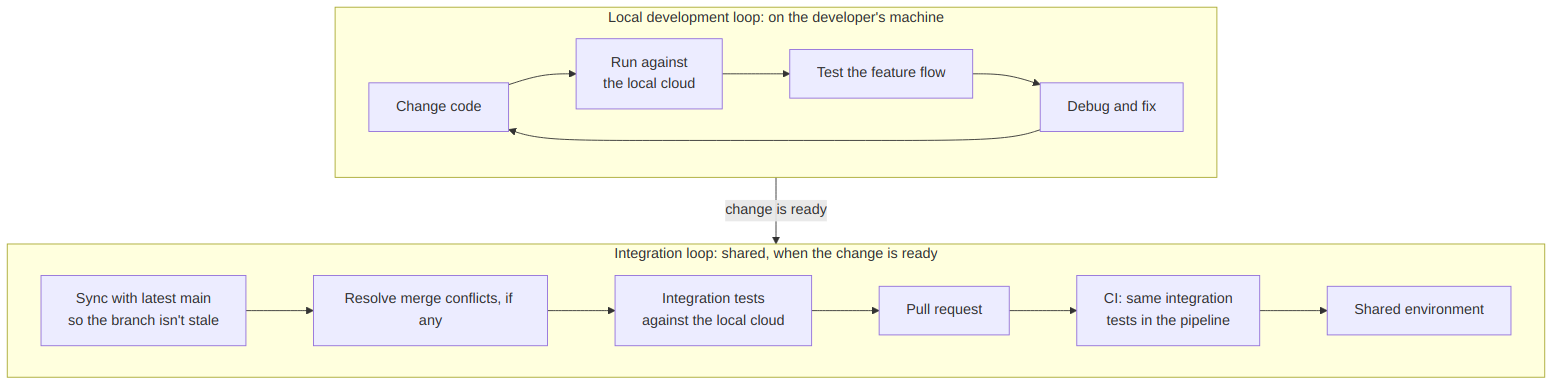
The outer loop stays exactly as it is. Git, pull requests, CI, shared integration environments and validation on real AWS are where independently written changes meet, and where real IAM, networking and service limits apply. A developer working locally still syncs with the latest main so the branch isn’t stale, resolves any merge conflicts, validates the integrated code, raises the PR and lets CI do its job.
Integration here means integration testing, not just merging code. Once a developer has verified a flow against the local cloud — sign in, upload a file, check the database — that same flow should become an automated integration test. It runs against the local stack before the PR is raised, and again in the pipeline. That turns “it worked on my machine” into a check that protects everyone else’s work.
What we wanted gone was the deployment sitting inside the development loop — changing code, running it, testing the feature flow and fixing what breaks, which a developer goes through dozens of times a day. Integration should happen at the PR, on purpose. It shouldn’t happen by accident every time two people deploy to the same stage.
What we actually needed to run locally
Here’s the profile-picture feature again, drawn as the services it depends on rather than the screens it touches.
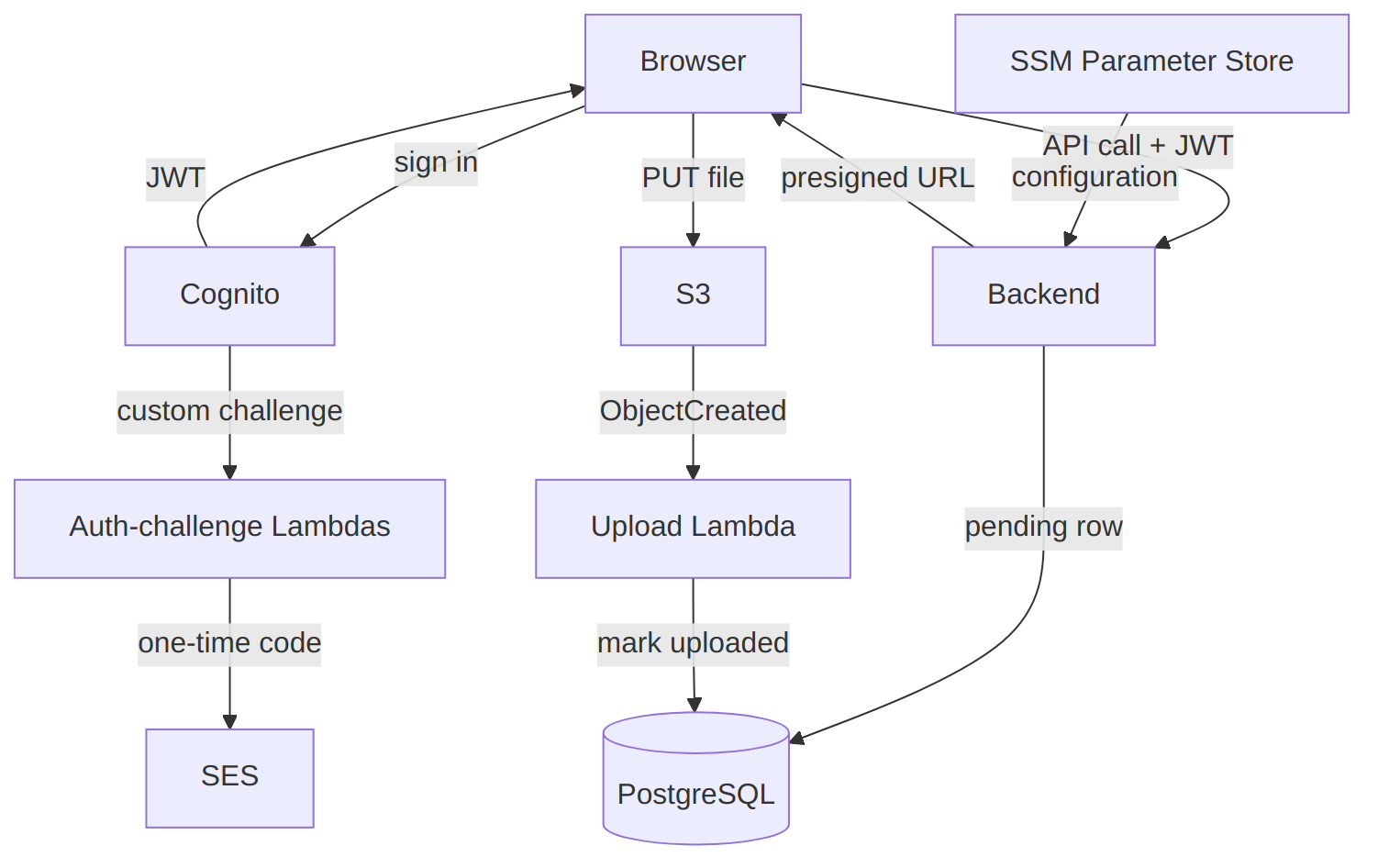
Count the boxes that are our own code: the backend and two kinds of Lambda. Everything else is a managed service, and most of the interesting behaviour lives in the arrows between them.
Getting the backend to run on a laptop was easy. The difficult part was getting all the connected cloud services to run locally as well.
This is what we mean by local cloud development: running enough of the cloud environment on your laptop so that your application can make real calls between services, just like it would in AWS, instead of using mocks or placeholders.
Why not just mock it?
Mocks were the obvious first thought, and they’re good at their job. A unit test with a mocked S3 client tells you the code called PutObject with the right bucket and key. That’s useful, and we’d keep doing it.
It doesn’t tell you that a real upload to a presigned URL produces an event, that the event reaches a Lambda, and that the Lambda can find and update the right row. A mocked Cognito won’t tell you whether the token’s issuer and claims match what the backend verifies. A mocked SES won’t tell you whether the step that sends the code ever fires. Mock every service and you’ve tested your assumptions about every service, which is a different thing from testing the flow.
So the question changed shape. Instead of “how do we fake these services?”, it became:
What if every developer had their own small, disposable cloud — real enough that the chain above actually runs, and cheap enough to throw away?
That idea runs through the rest of this article. Each tool we looked at answers a different-sized piece of it.
Serverless Offline: run the function without deploying it
The smallest version of the idea is a familiar one: I changed a Lambda handler and I want to call it without deploying.
That’s precisely what Serverless Offline is for. It’s a community plugin for the Serverless Framework that emulates API Gateway and Lambda on your machine. Other services, such as S3, SQS or DynamoDB, need more community plugins on top, each set up separately and each with its own limits. You start it, call localhost, change the handler, call it again. No deploy, no waiting for a stack update.
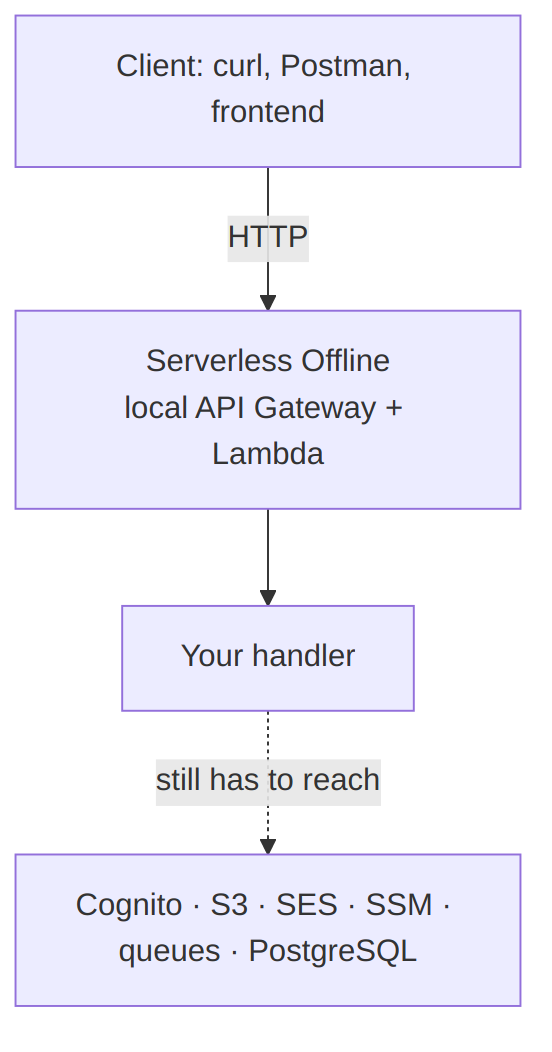
The solid arrows are what Serverless Offline makes local. The dotted one is the rest of the diagram from the previous section.
For the request-in, response-out part of the work, this is a great loop. It’s light — a Node process — and it starts fast. If most of what you do is shape API responses and handler logic, it may be all you need.
But looking at the dotted arrow we identify some loose ends. The moment the handler talks to Cognito, S3, SES, SSM, a queue or the database, you have three choices:
- Point it at real AWS. You’re back on shared resources and real credentials.
- Stub those calls. You’re back on mocks.
- Add a plugin or emulator per service. Each has its own setup and gaps, and you end up assembling a local cloud by hand.
That isn’t a flaw in Serverless Offline. It doesn’t try to be the cloud, and it’s honest about it. For us it simply made the scope boundary clear.
What it gave us: we no longer had to deploy just to test a Lambda function or an API change.
What it left: every service the function talks to — which, looking at the dependency diagram, is most of the feature.
So Serverless Offline solved the Lambda problem. It didn’t solve the cloud problem.
LocalStack: what if the services themselves were local?
If the gap is everything around the function, the next question writes itself. What if those services existed locally too?
That’s the layer LocalStack works at. It doesn’t run your handler for you so much as emulate the AWS APIs the handler calls. You point the SDK or CLI at a local endpoint, and S3, SQS, SNS, SES, SSM, Lambda and a long list of other services answer from a container. Your code doesn’t know the difference — it’s still making normal AWS calls.
That’s the most important distinction:
- Serverless Offline runs the function locally.
- LocalStack runs the cloud APIs the function depends on locally.
Our LocalStack PoC was built to test exactly that, using a deliberately event-heavy flow. It was deployed into LocalStack with an ordinary serverless deploy:
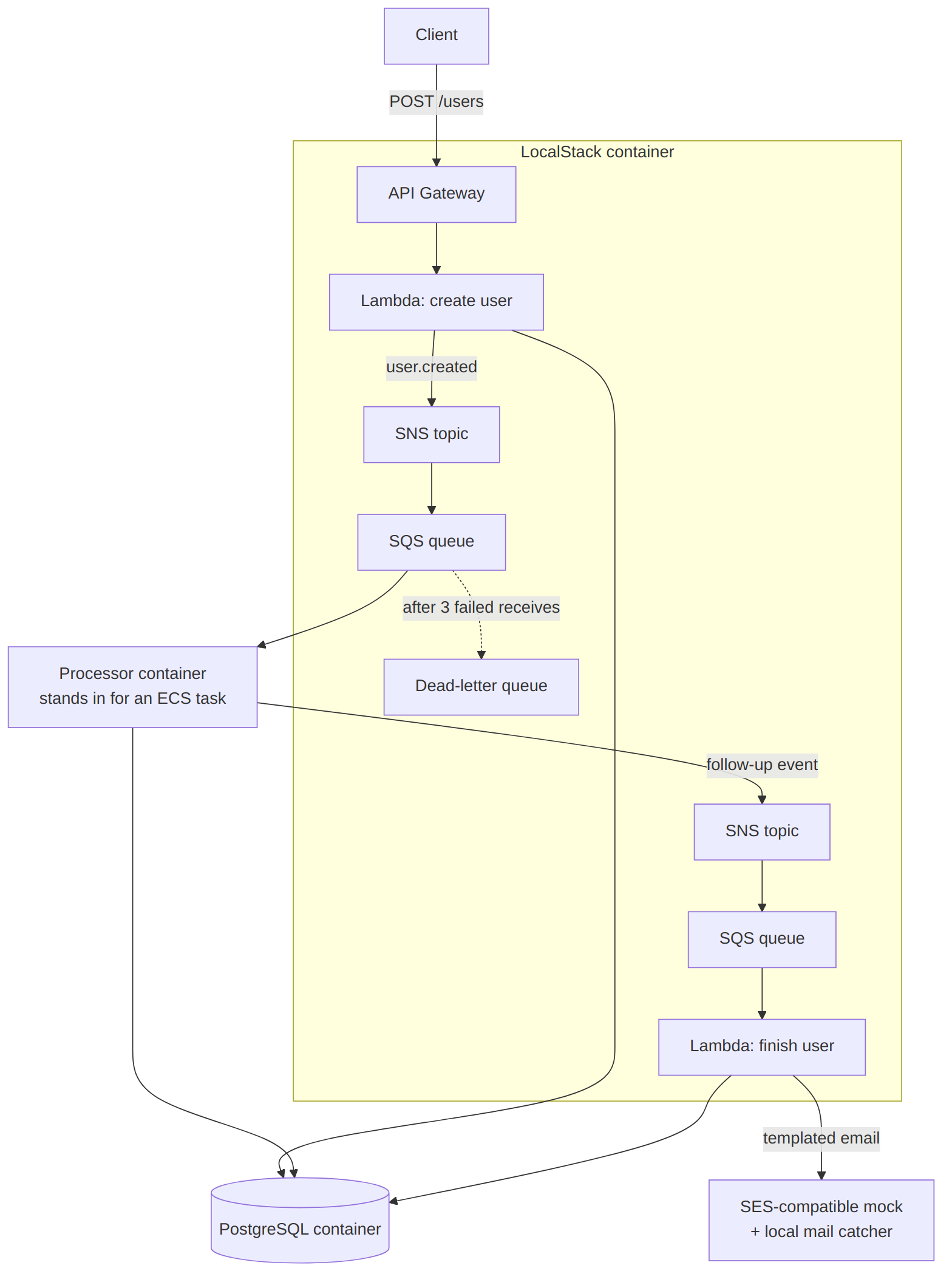
What this flow proves:
- No mocks. Every arrow in the diagram is a real call between services.
- Real messaging. A Lambda publishes to an (emulated) SNS topic, which fans out to an SQS queue with a real retry and dead-letter policy.
- A separate worker. A processor container reads from the queue, writes to PostgreSQL and publishes the next event.
- The wiring is tested, not one function. That’s something Serverless Offline couldn’t give us.
What runs outside LocalStack:
- Database: an ordinary PostgreSQL container.
- Processor: an ordinary container standing in for an ECS task, instead of emulated ECS.
- Email: an SES-compatible mock plus a local mail catcher.
- Why: partly for local convenience, and partly because services like RDS, ECS and Cognito were in LocalStack’s paid tiers and have limitations on its features.
The catch was everything around it: more containers to run, and more local configuration to keep working on every developer’s machine.
And there’s the account model. Since March 2026, LocalStack has shipped as a single image that needs an account and a per-developer auth token, CI included. Its free ‘Hobby plan’ is for non-commercial use, and commercial teams use paid per-licence plans (current pricing). For a lot of teams that’s a fair trade for a mature product with commercial support, IAM tooling and enterprise options. It’s still a real input when the plan is for every developer to run their own environment all the time.
Compared with Serverless Offline: LocalStack solved the services-around-the-function problem, which was the bigger one.
What it added: a heavier local stack, more configuration, and an account and licence per developer.
How much cloud goes on every laptop?
LocalStack got us much closer. It also made a question concrete that had been sitting in the background since the “small cloud per developer” idea: if every developer runs their own cloud, how much cloud are we putting on every laptop?
A shared environment is paid for once. A local one is paid for on every machine, every day. Memory, CPU and disk all multiply by headcount. So do image downloads on a new machine, and so does the number of containers that have to be healthy before anyone can test anything. Those laptops are already running an IDE, a browser, a frontend dev server, a backend in watch mode and a database — and, increasingly, a coding agent.
The operational costs multiply too:
- Setup. Someone has to own the scripts that create pools, buckets, parameters and functions in the right order, and keep them working.
- Version drift. If everyone pulls
latest, two developers can be running different emulator versions and seeing different behaviour. - Licensing. Per-seat licences and per-developer tokens scale with the team, and CI needs its own.
- Isolation. “Independent” in practice meant one stack per Docker host. Fixed container names and ports meant you couldn’t run two copies side by side.
On the other side of the ledger, local iteration takes load off the shared environment: fewer throwaway deployments, fewer invocations and test resources in a shared account, less contention for the one stage everyone needs.
By this point, the requirement had quietly changed. It was no longer “emulate AWS”. It was closer to: a broad local cloud that sits next to the application, starts quickly, needs nothing from each developer except Docker, and can be thrown away.
Floci: a different bet on the same layer
With that requirement in mind, we evaluated another option: Floci.
Floci sits at the same layer as LocalStack: AWS-compatible APIs behind one local endpoint, used through the normal SDKs and CLI. So it isn’t a different kind of tool. What makes it different is the set of bets it makes, and a few of them lined up with the requirement above.
The account model is the clearest. Floci is MIT-licensed and needs no account or auth token. For a setup where every developer and every CI job runs its own copy, that removes a whole category of onboarding and secret management.
The second is coverage. Its docs list a broad AWS surface, and the services our projects depend on are all in it: Cognito, S3, SES, SSM and Lambda, etc.
The third is how it runs Lambda. Functions execute in real runtime containers via Docker, based on AWS’s public Lambda images, rather than as in-process callbacks. For our triggers that matters: a Cognito challenge trigger or an S3 trigger is supposed to behave like a function, with its own environment and network, not like a method call.
Finally, it’s positioned as light enough for laptops and small CI runners. Floci publishes figures of about 24 ms startup and 13 MiB idle memory. Those are vendor-published claims.
We tried to stay sceptical. Floci is a much newer project than LocalStack, with a shorter track record and no equivalent of LocalStack’s commercial support. It releases often — twice a month.
So we built a PoC similar to what we tried with localstack:
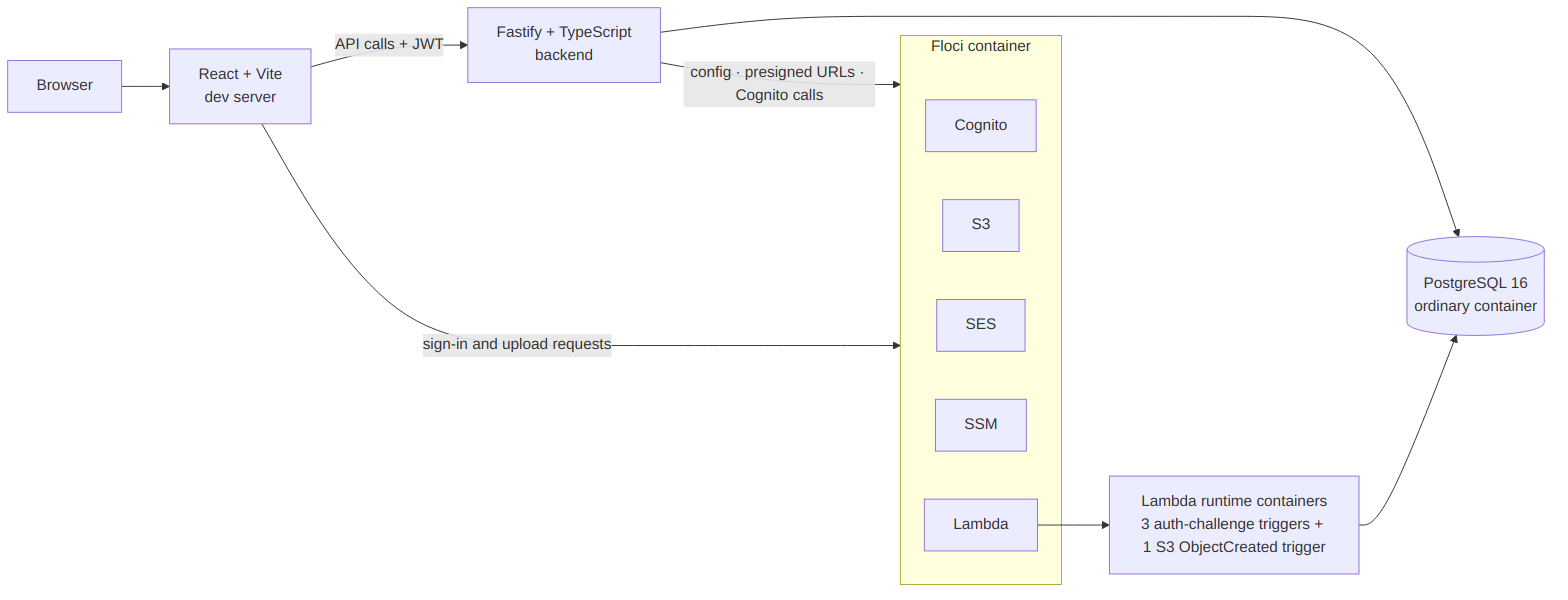
It’s worth being exact about what’s in that picture and what isn’t. The PoC implements Cognito sign-in with custom-challenge Lambda triggers and an emailed one-time code, plus an S3 upload whose ObjectCreated event triggers a Lambda that updates PostgreSQL. The backend loads its configuration from SSM.
That also means the two PoCs aren’t like-for-like. The LocalStack one stressed messaging; the Floci one stresses authentication and storage events. Read them as two probes into the same question, not as a benchmark.
Compared with LocalStack: Floci tackles the same problem at the same layer, but with a different model — no account gate, no paid tiers, and a lightweight, disposable positioning. The trade is maturity and support.
Two things that widened the lens
A sandbox for coding agents
Agents weren’t on our original list of considerations, but they’re hard to leave out now.
A coding agent like Claude Code can edit code, run commands, start services, run tests, read the failures and try again, with much less human review of each step than a developer would get. That’s useful precisely because it’s fast and repetitive. But it raises an awkward question: what cloud should that loop run against?
Giving an agent credentials to a real AWS account so it can experiment means real cost, real security exposure and a real blast radius. A local cloud that exists only for that session, and can be deleted afterwards, is a much more comfortable place for it to break things.
Both projects have noticed this. LocalStack mentions agent workflows in its commercial offering. Floci’s creator has described running an isolated instance per agent to keep runaway operations away from real accounts (Quarkus Insights).
For us, this is a direction rather than a finished piece of work. It’s one more reason we want a local environment that starts quickly, needs no real credentials and is safe to throw away.
From AWS locally to cloud locally
Our application is AWS-only, and we haven’t touched Azure, GCP or Oracle Cloud. Multi-cloud wasn’t a requirement.
Still, Floci now ships separate emulators for all four clouds under the same no-account model. That nudges the idea from “run AWS locally” towards “run cloud infrastructure locally”. For a team that might one day integrate with another provider, it’s a direction worth watching .
So, how different are they actually?
By now the differences should be familiar. Put side by side:
| Serverless Offline | LocalStack | Floci | |
|---|---|---|---|
| Primary purpose | Run Lambda/API handlers locally | Emulate AWS services locally, plus a commercial platform | Emulate AWS services locally, open source |
| Lambda / API | Strong — its core job | Yes | Yes |
| AWS service coverage | Out of scope | Broad; some services in paid tiers | Broad |
| Service-to-service flows | No | Yes | Yes |
| Local cloud model | Functions only | Full local cloud | Full local cloud for development, testing and CI; real Docker containers where fidelity matters |
| Account / licensing | No account; open-source plugin | Account + per-developer token; Hobby is non-commercial, paid per licence otherwise | No account; MIT |
| Pricing (checked Oct 2026) | Free | Hobby free for non-commercial use; Base from $39 per licence/month (billed annually); Ultimate $89; Enterprise custom | Free; no paid tier |
| Footprint | Light, because the scope is narrow | Broader, heavier environment | Positioned as light |
| Maturity | Long-used in its niche | Most mature, commercial support | Newer, community-supported |
| Developer experience | Fastest for handler changes | Broad, with more to set up | Broad, with its own gaps to work around |
| Plugins / extensions | Is itself a Serverless Framework plugin; combines with others such as serverless-esbuild | LocalStack Extensions (Python apps running inside the container), available on all plans via an official library | No plugin system documented; works with the standard AWS CLI and SDKs, Terraform, OpenTofu and CDK |
| Multi-cloud | AWS only | AWS; Snowflake as a separate product; Azure announced | Separate emulators for AWS, Azure, GCP and OCI |
| Known vulnerabilities (checked Oct 2026) | Past access-restriction bypass, fixed in 8.6.0; scan its npm dependencies like any other | A few product CVEs historically (e.g. CVE-2023-48054, fixed in 3.0.0); image dependency CVEs patched regularly | No Floci-specific CVEs found; dependency CVEs (e.g. Netty) patched in recent packaged builds; private vulnerability reporting policyFloci |
| Best fit | Fast Lambda/API development on a laptop | Teams wanting a mature, supported AWS platform | A free, broad local cloud per developer — validated flow by flow |
The row that matters most is the first one. These aren’t three competitors on one scale. Serverless Offline is a function runner. LocalStack and Floci are both service emulators, and they differ less in what they do than in how they’re packaged, licensed, supported and positioned.
So instead of ranking them, we traced the choice through what each tool actually documents — its scope, its licence and its plan terms:
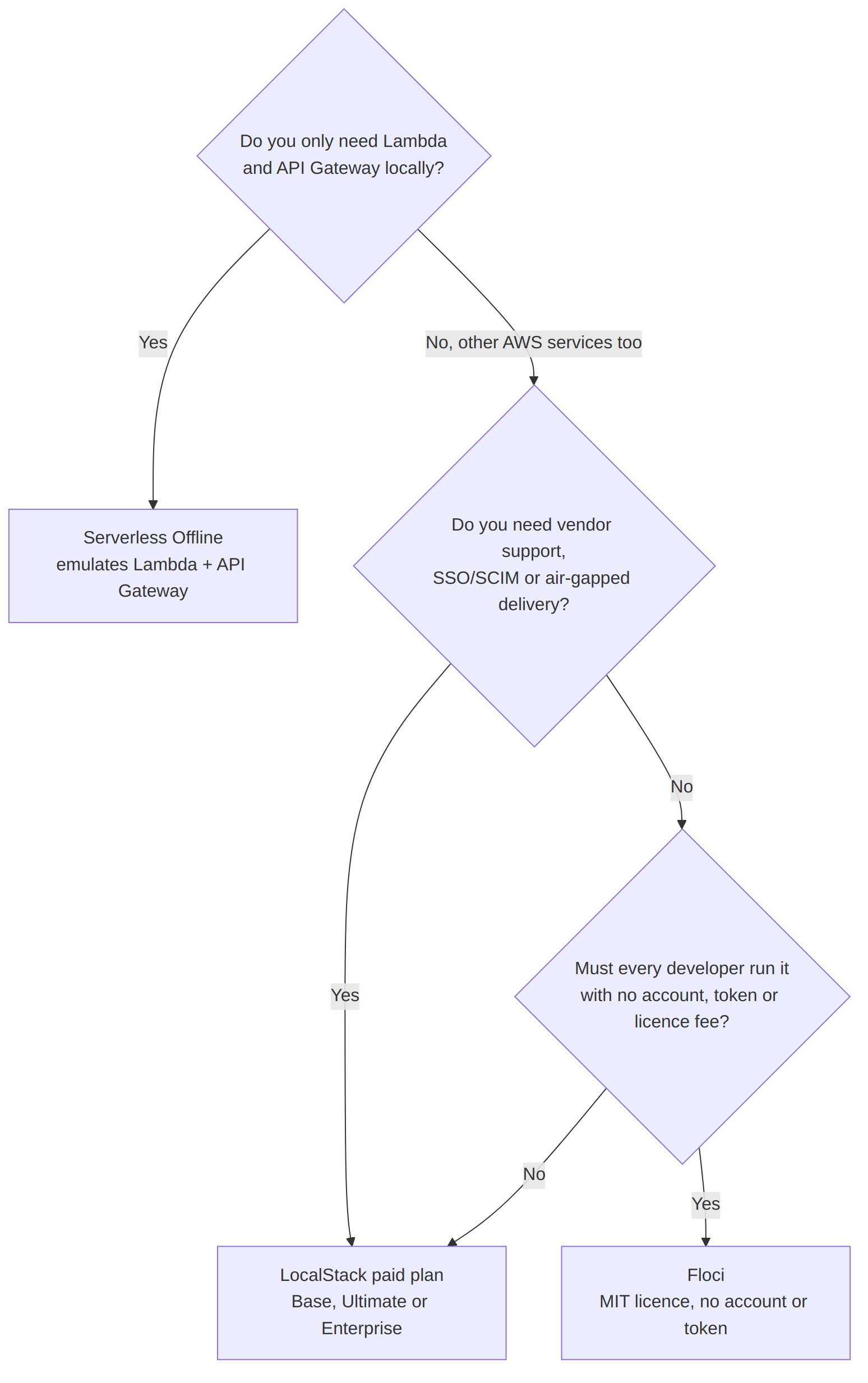
Each branch rests on the vendors’ own documentation as of October 2026:
- Serverless Offline: it emulates Lambda and API Gateway only, and the plugin is maintained mainly by its users. Any other AWS service needs a separate plugin or emulator, such as serverless-dynamodb-local for DynamoDB. There are practical limits too: changes to
serverless.ymlneed a restart, API keys are simulated with a random token read only from headers, and Lambda layers need Docker mode. - LocalStack: its plan pages limit Hobby to non-commercial use, and put vendor support, SSO/SCIM and air-gapped delivery in paid plans.
- Floci: States the MIT licence and that no account or auth token is needed.
For a commercial team the Hobby plan isn’t an option, so the last “No” leads to a paid LocalStack plan. Your answers may differ from ours, which is why the questions are laid out.
What a local cloud doesn’t replace
It would be easy to read all of this as “we don’t need AWS to test any more”. That would be wrong, and it’s the mistake we most want to avoid passing on.
An emulator is an approximation of AWS, written by people who aren’t AWS. Some things it can’t give you at all, and some it gives you in a relaxed form so that local development is practical:
- IAM. Local credentials are placeholders, and policy enforcement is limited or opt-in. Code that works locally hasn’t been tested against real permissions.
- Networking. VPCs, security groups, private endpoints and DNS behave differently, or not at all.
- Quotas and limits. Throttling, payload limits and concurrency limits rarely show up locally.
- Edge cases. Eventual consistency, retry timing and service-specific quirks are where emulators differ most.
- Observability. Locally you debug with container logs (
docker logs) and whatever log APIs the emulator provides. Your real CloudWatch alarms, dashboards and production traffic aren’t there, so monitoring and alerting still have to be checked in a real AWS environment.
Security cuts both ways too. A local cloud means fewer developers need routine access to shared resources, and a mistake lands in a container you can delete rather than an environment other people depend on. But local doesn’t automatically mean safe. Emulators that start containers usually mount the Docker socket, which effectively hands over the host’s Docker daemon. Published ports can be reachable from your network unless they’re bound to localhost. Local token and endpoint settings are relaxed on purpose and must never leak into production config. And data should stay synthetic, because a laptop has none of the controls a real account has. Passing locally says nothing about production security.
So the local cloud doesn’t remove stages from the lifecycle. It changes where problems are first found:

The loop on the left is where most iterations should happen. Everything to the right still happens, and the arrows back are the important part: when CI or a shared environment finds something, you reproduce it locally rather than deploying fixes until it goes away.
A local cloud moves more validation earlier. It doesn’t remove the need to validate in the cloud.
Where we landed
For our requirements, Floci appeared to be the better fit.
The reasons are specific to what we were trying to do. Its documented coverage includes every service our projects usually need. There’s no per-developer account or token, which matters when the plan is for every developer — and eventually every CI job — to run its own copy. Its model is local and disposable by design, which is the shape of the “small cloud per developer” idea. Its lightweight positioning fits laptops that are already busy. And its direction on agent isolation and other clouds lines up with where we think local environments are heading.
None of that makes Floci better than LocalStack in general. We’d choose LocalStack if we needed commercial support with SLAs, enterprise governance such as SSO and SCIM, air-gapped delivery, or advanced IAM policy testing. We’d also choose it if our organisation had already standardised on it, or if a service we depend on behaved correctly there and not in Floci. Those are real strengths of a mature platform, and a free licence doesn’t compensate for a flow that doesn’t work.
And we’d still reach for Serverless Offline when the work really is just Lambda and API handlers. If you want the fastest possible function-level loop with almost nothing extra running, a full local cloud is more than you need.
Choosing was the easy part
We had a direction. But picking an emulator from documentation and a PoC plan is the easy bit. The harder question is whether our actual application could live inside it.
That breaks down into very concrete questions:
- Can a developer start from a clean machine and bring the whole thing up?
- Can the frontend sign a user in?
- Can Cognito issue a token the backend actually accepts?
- Can SSM hand the backend its configuration?
- Can SES capture the one-time code so a developer can read it?
- Can an S3 upload trigger a Lambda, and can that Lambda reach PostgreSQL?
- Can the whole flow from the start of this article run without deploying anything to AWS?
That’s what we tested next.
Part 2 — Building our local cloud environment with Floci
Part 2 is the implementation. It covers the Docker/podman setup and the networking between containers, the Cognito sign-in flow and its Lambda triggers, SSM configuration, the PostgreSQL integration, how the frontend talks to the emulator through the Vite dev server, JWT and JWKS handling for locally issued tokens, how we debugged it, and the workarounds we needed along the way.